We’ve added a few conference rooms and Equipment mailboxes and I decided to add custom resource properties to distinguish the rooms and equipment . The properties indicate what features are specific to a resource like the conference room conference call phone and equipment model. By default, these properties are not configured for resource mailboxes.The Get-ResourceConfig cmdlet used in the screen shot below indicates that there are no resource properties configured just yet.

The Set-ResourceConfig cmdlet is used to set/ add properties to a resource mailbox. The one issuse with directly using this cmdlet as specified is that it overwrites the last set resource property. Based on Microsoft documentation, the way to create multiple resource mailbox properties is to set a resource variable and use the Add method as shown in the next screen shot:

Add features for the Conference rooms using the Add method:
[PS] C:\>$resourceconfig.ResourcePropertySchema.Add("Room/WhiteBoard")
[PS] C:\>$resourceconfig.ResourcePropertySchema.Add("Room/PC")
[PS] C:\>$resourceconfig.ResourcePropertySchema.Add("Room/Projector")
[PS] C:\>$resourceconfig.ResourcePropertySchema.Add("Room/TV")
[PS] C:\>$resourceconfig.ResourcePropertySchema.Add("Room/ConferenceCallPhone")
Use the Set-Resourceconfig cmdlet to update the Resource Properties:
[PS] C:\>Set-ResourceConfig -ResourcePropertySchema $resourceconfig.ResourcePropertySchema
Resource properties can also be created for Equipment mailboxes using either the Add method or the '+=' counter:
[PS] C:\Windows\>$resourceconfig = Get-ResourceConfig
[PS] C:\Windows\>$resourceconfig.ResourcePropertySchema+=("Equipment/HumidityAmbientto100")
[PS] C:\Windows\>$resourceconfig.ResourcePropertySchema+=("Equipment/Workspace48x30x36")
[PS] C:\Windows\>$resourceconfig.ResourcePropertySchema.Add("Equipment/SingletonSCCHModel22")
[PS] C:\Windows\>Set-ResourceConfig -ResourcePropertySchema $resourceconfig.ResourcePropertySchema
Display all configured Resource properties:

The Room resource properties are can also be displayed using Exchange Management Console:

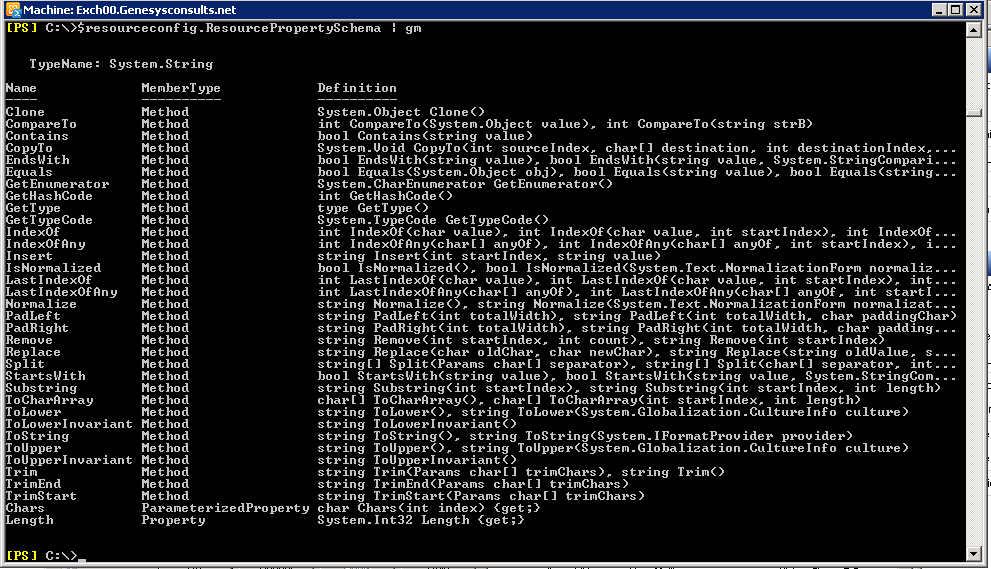
On a side note though, I was kind of surprised not to find the Add method as a member of the ResourcePropertySchema as indicated in the screenshot below. Maybe I’m missing something. I’ll do some more research on this. But, according to Microsoft documentation, this would be the way to configure Resource mailbox properties.
 Chinny Chukwudozie, Ai architecture.