I ran into a disk space situation on a new database server and decided to move the Tempdb files to a new drive location. My first thought was to detach the database and move the files.
It turns out you can’t detach a tempdb database since it’s a system database. The following T-SQL query helped achieve the task.
Determine the Logical Names of the TempDB Data and Log files:
Login to SQL2012 Management Studio.
Expand the Databases tree and expand the system databases tree.
Select and right-click on the TempDB database.
Select Properties and on the properties window, note the tempdb files logical names as indicated below:
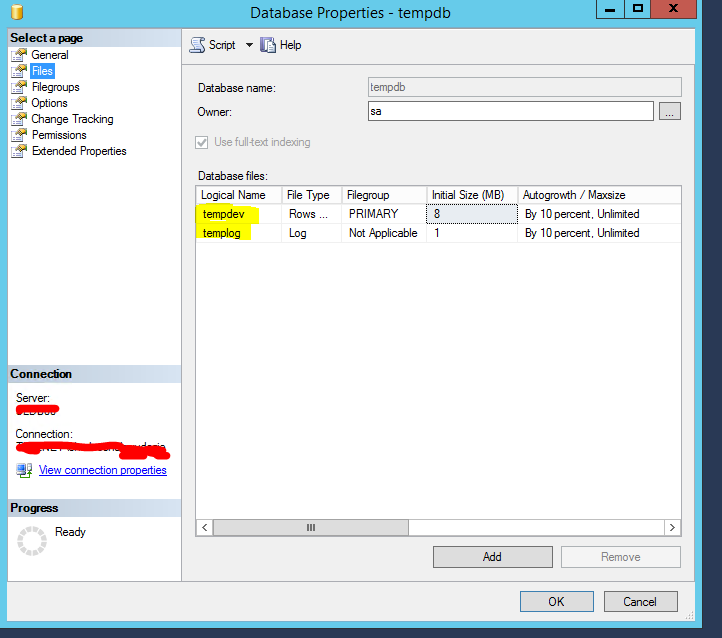
Use the following script to move the files Edit the file name parameter values to reflect the destination path :
USE master;

	GO

	ALTER DATABASE tempdb

	MODIFY FILE

	(NAME = tempdev, FILENAME = 'E:\MSSQLData\Tempdb.mdf');

	GO

	ALTER DATABASE tempdb

	MODIFY FILE

	(NAME = templog, FILENAME = 'F:\LogFiles\Tempdb.ldf');

	GO
Restart the SQL Instance after the move.
I verified that the file path was changed . I finished by removing the old temp files from the previous location.
 Chinny Chukwudozie, Ai architecture.