This is the first of two posts. This one focuses on the technical aspects; the next will address the CXOs perspective, providing a comprehensive unified point of view.
Introduction
When building AI-powered applications for the enterprise, a common challenge emerges: how do you maintain user identity and access controls when an AI agent queries backend services on behalf of a user?
In many implementations, AI agents authenticate to backend systems using a shared service account or with PAT (Personal Access Token) tokens, effectively bypassing row-level security (RLS), column masking, and other data governance policies that organizations carefully configure. This creates a security gap where users can potentially access data they shouldn’t see, simply by asking an AI agent.
In this post, I’ll walk through how we solved this challenge for a current enterprise customer by implementing Microsoft Entra ID On-Behalf-Of (OBO) secure flow in a custom multi-agent LangGraph solution, enabling the Genie agent to query data and the custom SQL data/task agent designed to modify or update delta tables, to do so as the authenticated user, while preserving all RBAC policies.
The Architecture
Our system is built on several key components:
Chainlit: Python-based web interface for LLM-driven conversational applications, integrated with OAuth 2.0–based authentication. Customizing the framework to satisfy customer UI requirements eliminated the need to develop and maintain a bespoke React front end. It fulfilled the majority of requirements while reducing maintenance overhead.
Azure App Service: Managed hosting with built-in authentication support and autoscaling.
LangGraph: Opensource Multi-agent orchestration framework.
Azure Databricks Genie: Natural language to SQL agent.
Azure Cosmos DB: Long-term memory and checkpoint storage.
Microsoft Entra ID: Identity provider with OBO support.
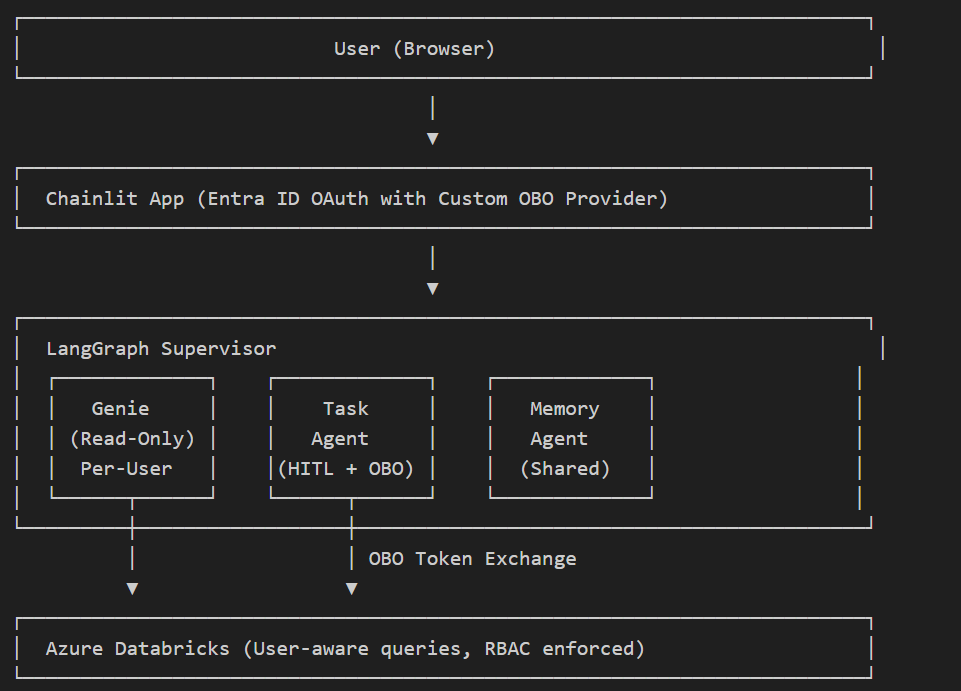
This shows:
Genie: Read-only natural language queries, per-user OBO
Task Agent: Handles sensitive operations (SQL modifications, etc.) with HITL approval + OBO
Memory: Shared agent, no per-user auth needed
The Problem with Chainlit OAuth Provider
Chainlit’s built-in AzureADOAuthProvider hardcodes the scope to User.Read, which is a Microsoft Graph API permission. This means the access token it returns has audience = graph.microsoft.com. That token works fine for fetching user profiles from Graph, but it’s useless for OBO — when your app tries to exchange it for a Databricks token, Azure AD rejects the request because the token wasn’t issued for your app.
For OBO to work, the access token’s audience must match your app’s client ID. That requires requesting your app’s own custom scope (api://{client_id}/access_as_user) during login, which Chainlit’s built-in provider doesn’t support — there’s no way to override the hardcoded User.Read scope.
Solution: Custom Entra ID OBO Provider
The custom OBO provider (obo_provider.py) solves the above problem by replacing the built-in provider entirely by requesting the correct custom scope and producing a token with your app as the audience.
Audience (aud) is a claim inside every OAuth access token that says “who is this token meant for?” — like the “To:” field on an envelope. Azure AD sets it based on the scopes you request: if you request User.Read, the audience is graph.microsoft.com; if you request api://{client_id}/access_as_user, the audience is your app’s client ID.
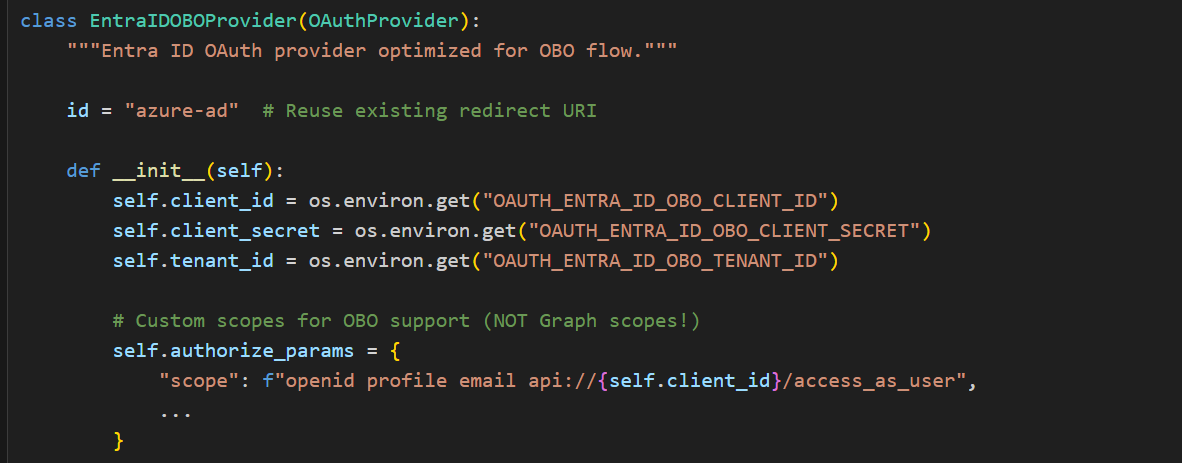
The custom OBO provider requests api://{client_id}/access_as_user so that the access token’s audience matches your app — which is exactly what MSAL requires to perform an On-Behalf-Of exchange to Databricks. The built-in Chainlit provider would have produced a Graph-scoped token, and Azure AD would reject the OBO exchange because the token wasn’t issued for your app. Since this new token is scoped to your app (not Graph API), user profile info is extracted from the ID token claims instead.
Per-User Agent Creation — Why It Matters
When a user authenticates via Azure AD, their OAuth token carries their unique identity — their permissions, group memberships, and data access rights. Once we have the user’s access token (with the correct audience), we exchange it for a Databricks-scoped token using MSAL’s On-Behalf-Of flow. This OBO exchange is what enables per-user agent creation: the resulting token lets Genie execute queries as that specific user, and Databricks enforces row-level and table-level security based on who is actually calling the API. If agents were cached globally with a shared service account, every user would inherit the same unrestricted access — a privilege escalation vulnerability.
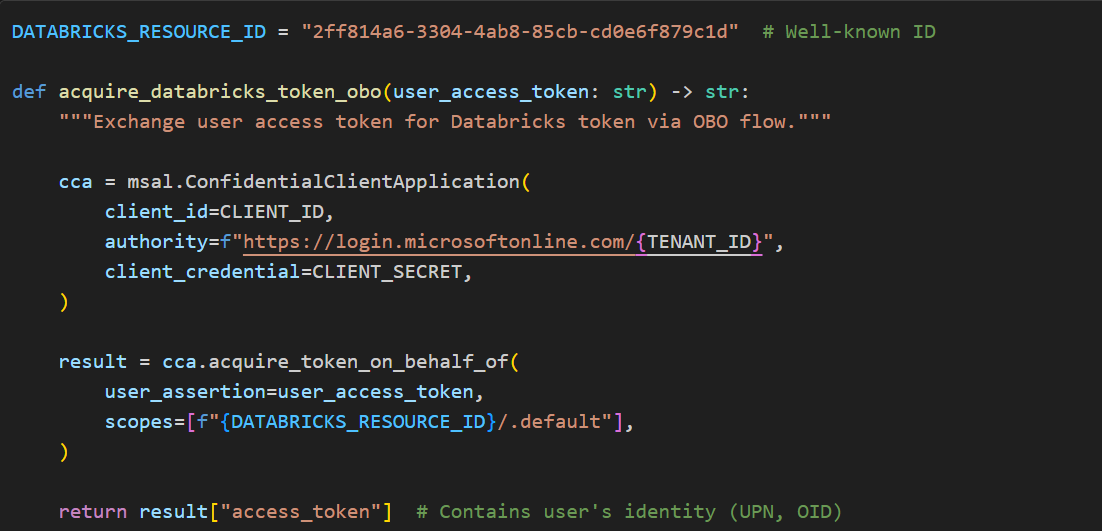
This is why user-specific agents are never cached. Each chat message that routes to Genie creates a fresh WorkspaceClient and GenieAgent bound to that user’s OBO token. The cost is negligible: MSAL internally caches tokens until they expire (~1 hour), so the Azure AD round-trip only happens once per session, and the client/agent instantiation itself is trivial compared to the Genie query latency. Meanwhile, shared stateless resources — the LLM model, embeddings client, Cosmos DB client — remain cached as singletons since they carry no user identity.
The principle is simple: cache what is shared, create what carries identity. The OBO exchange bridges the gap between the user’s Azure AD session and Databricks’ security model, ensuring end-to-end RBAC enforcement from the browser all the way through to the SQL warehouse, with zero risk of one user’s permissions leaking to another.
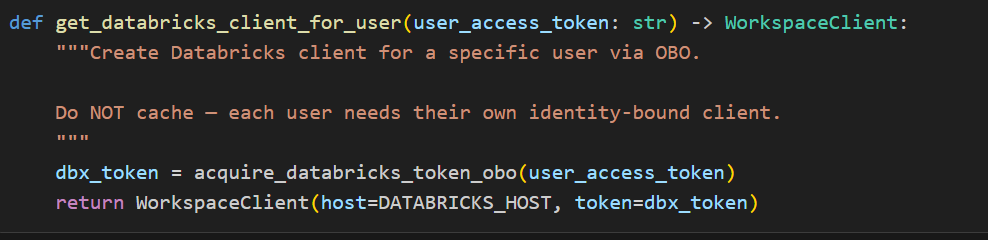
Using the OBO Token with Databricks Genie
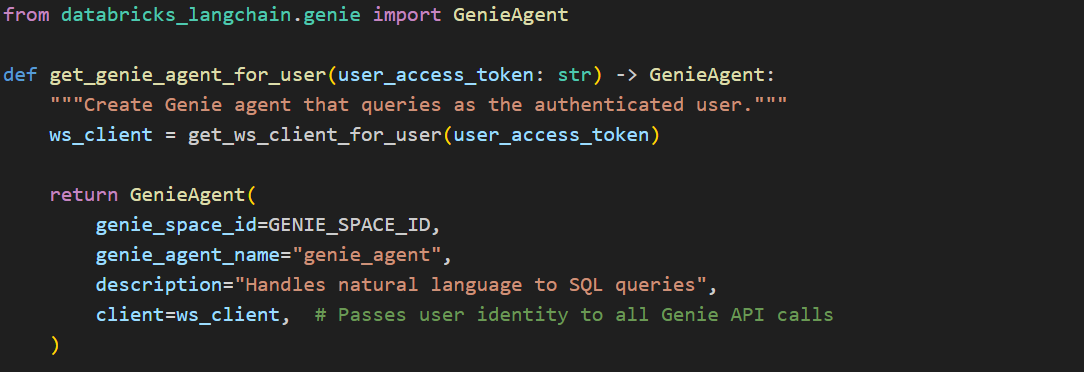
The key integration point is passing the OBO-acquired token to the Databricks SDK’s WorkspaceClient as indicated in the above screenshot, which the Genie agent uses internally for all API calls as shown in the following image.
Initialize Genie Agent with User’s Access Token:
Wire It Into LangGraph:
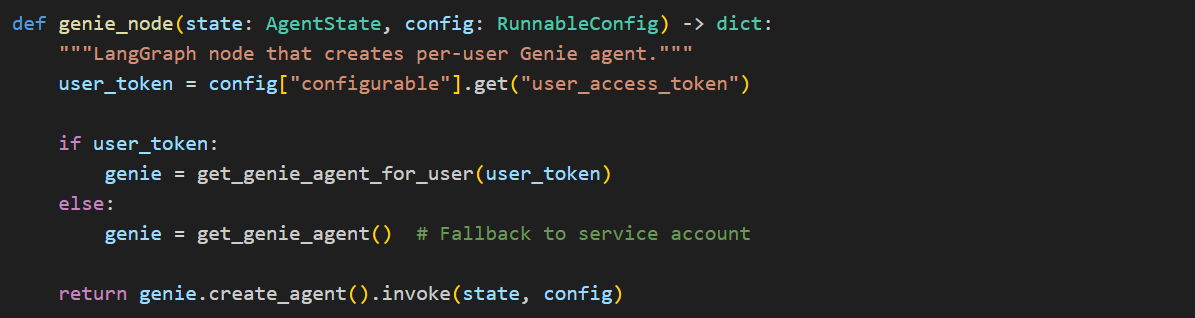
The user_access_token flows from Chainlit’s OAuth callback → session config → LangGraph config → agent creation, ensuring every Genie query runs with the authenticated user’s permissions.
Human-in-the-Loop Approval for Destructive Operations.
While the Genie agent handles natural language-to-SQL queries (read-only by design), the system is architected to support direct SQL execution for data modifications such as UPDATE, DELETE, and INSERT operations. Since these operations mutate data, any destructive operation is paused before execution using LangGraph’s interrupt feature and surfaced to the user for explicit confirmation — the same mechanism currently used for destructive intent detection in the Genie agent (see hitl.py).
Critically, the On-Behalf-Of token flow ensures that even user-authored SQL executes under the user’s own Databricks identity. This means two independent safety layers work in tandem:
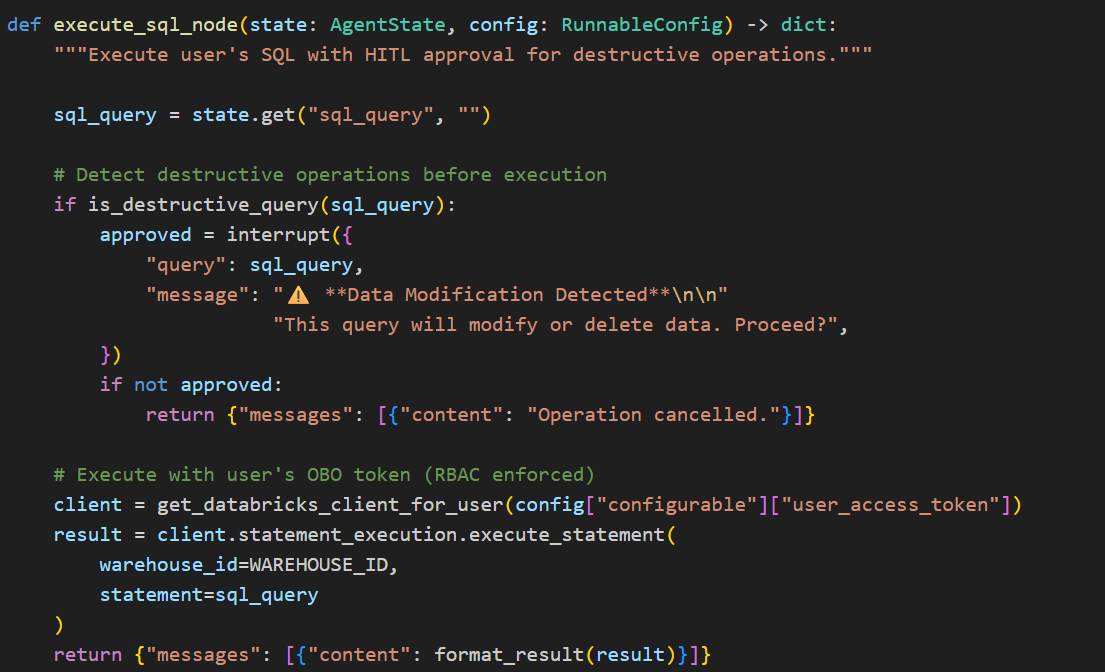
HITL approval prevents accidental or unintended mutations — the user must explicitly confirm before any write operation runs
OBO-enforced RBAC prevents unauthorized mutations — even if approved, the query can only modify data the user has permissions to change
This separation of concerns — intent verification (HITL) and access control (OBO) — means neither layer is a single point of failure. A user cannot bypass Databricks permissions by approving a query, and a privileged user cannot accidentally mutate data without seeing what they’re approving.

Entra ID App Registration Requirements
Your Entra ID app registration needs:
- API Permissions: Azure Databricks → user_impersonation (admin consent required)
- Expose an API: Scope access_as_user on URI api://{client-id}
- Redirect URI: {your-app-url}/auth/oauth/azure-ad/callback
Lessons Learned
- Token audience matters: OBO fails if your initial token has the wrong audience
- Don’t cache user-specific clients: breaks user isolation
- ID tokens contain user info: use claims when you can’t call Graph API
- HITL for destructive ops: even with RBAC, require explicit user confirmation
Conclusion
By implementing Entra ID OBO flow in our multi-agent system, we achieved:
- User identity preservation across AI agents
- RBAC enforcement at the Databricks/Unity Catalog level
- Audit trail showing actual user making queries
- Zero-trust architecture: the AI agent never has more access than the user
- Human-in-the-loop for destructive SQL operations
This approach enables any organization building AI systems that supports OAuth 2.0 to participate in an on‑behalf‑of (OBO) flow. More importantly, it establishes a critical layer of AI governance for enterprise‑grade, custom multi‑agent solutions, aligning with Microsoft’s Secure Future Initiative (SFI) and Zero Trust principles.
As organizations accelerate toward multi‑agent AI architectures and broader AI transformation, centralized services that standardize identity, authorization, and user delegation become foundational. Capabilities such as Microsoft Entra Agent ID and Azure AI Foundry are emerging precisely to address this need – enabling secure, scalable, and user‑context–aware agent interactions.
In the next post, I’ll shift the lens from architecture to outcomes – examining what this foundation means from a CXO perspective, and why identity‑first AI governance is quickly becoming a board‑level concern.
 Chinny Chukwudozie, Ai architecture.