In this post, I would like to talk about using the ntdsutil utility for metadata cleanup. A domain controller failure ‘DC00’ recently occurred in my lab. Running the repadmin /replsum command confirmed a replication error and showed DC00 as unavailable:

Since a dcpromo was obviously out of the question, I used the Ntdsutil metadata cleanup command to effect the removal in the following steps.
Start the Ntdsutil Tool:
Open a command prompt as an administrator. At the prompt, type ntdsutil and press enter. This put me directly in the ntdsutil mode. Entering ‘help’ shows all the options directly available :

At the Ntdsutil prompt, select and type metadata cleanup command and press enter.
At the metadata cleanup prompt, type connections and press enter.
At the server connections prompt, type connect to server ws2012r2 and press enter. Where ws2012r2 is a domain controller dns name.
After connecting to the domain controller, type quit at the server connections prompt to exit out to the metadata cleanup prompt.
Now at the metadata cleanup prompt, type select operation target and press enter. Entering this mode, will enable me select the sites, domains and servers I intend to work with.

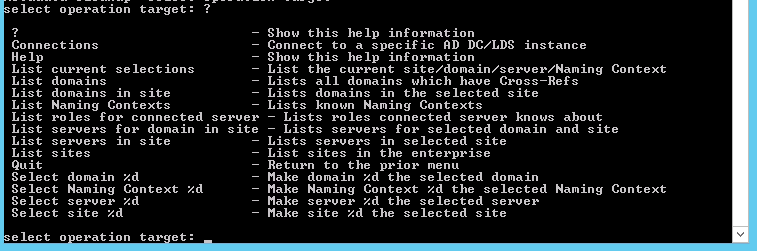
From the help options available at select operation target, select, and type list domains. Press enter.
At the select operation target type select domain 0. Where domain 0 is the intended domain.
At the next select operation target prompt, type list sites and press enter.
At the next select operation target prompt, type select site 0 and press enter.
At the next select operation target prompt, type list servers in site and press enter.
At the next select operation target prompt, type select server 1 where server 1 is the offline domain controller object I intend to remove. Press enter.
At the next select operation target prompt, type quit to exit out to the metadata cleanup prompt.
At the next metadata cleanup prompt, type Remove selected server.


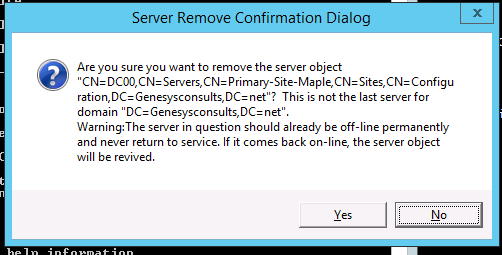
At the ‘Server Remove Confirmation Dialog’, click yes to remove the failed Domain Controller server object.After the removal is successful, I exit out of the ntdsutil tool by typing quit all the way up. I ran the repadmin /replsummary command again to verify and the result shows no replication errors.
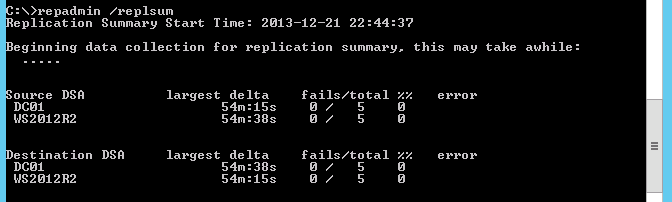
I still had to go into the DNS forward lookup and reverse lookup zones to manually remove references to the offline domain controller object.I hope this helps.
 Chinny Chukwudozie, Ai architecture.
15 responses to “Using NTDSUTIL Metada Cleanup to Remove a Failed/Offline Domain Controller Object.”
Thanks heaps for the post. Make the job easy!
You’re welcome !
Thank you so much for the detailed explanations, as this is not a task we admins do on a daily basis your article helped me a lot. Keep up the good work!
Thanks dude. I’m glad you found it helpful.
I am no longer certain the place you’re getting your information, but good topic.
I must spend some time learning much more
or understanding more. Thank you for excellent information I was looking
for this information for my mission.
Thank you for the post. it is helpful. Can you also please let us know how to cleanup the DNS? I have demoted DCs (years ago) DNS entries in the DNS server which prevented me to demote DCs recently.
Thanks in advance.
Hello Louise, you will have to drill into your DNS Forward lookup zones and manually delete any lingering old domain controllers. Also, in Active Directory Sites and Services, navigate to Sites and Servers and manually delete the already demoted DC server objects. I hope this helps. Thanks.
[…] After uninstalling AD from the WS2003R2 servers and restarting both machines. I went through the clean up process to manually remove any lingering objects in AD integrated DNS and AD Sites and Services referencing the demoted Windows 2003 R2 servers. I’ve written about this in previous post. […]
Hi
I have done the same steps but in the last its showing an error stating Access dined. I am using an enterprise admin access id. Can you please suggest any solution for this issue.
Regards
Abhilash K Joy
Hello Abhilash,
Thank you for the response to my blog. Concerning the error, please make sure the admin user object is a member of the Domain Admins and Enterprise Admins Security Groups. Also, just in case, check the explicit permissions on the restore file.
Thanks.
Hi
I have a child domain ( mall.com.jo ) in the forest ( forest.com ).
my child server got crashed without any backup and i need to rebuild a child domain server with the same name and detailed because its synchronized with office 365.
is there is any way please ??
when I tried to promote the new server it gave me that that “verification of child domain input failed , the child domain name has an invalid format ”
logs:
dcpromoui 914.6D8 029D 16:55:18.024 ValidateDomainDnsNameSyntax for parent forest.com returned 0
dcpromoui 914.6D8 029E 16:55:18.024 Enter ValidateChildDomainLeafNameLabel
dcpromoui 914.6D8 029F 16:55:18.024 Enter DoLabelValidation
dcpromoui 914.6D8 02A0 16:55:18.024 Enter Dns::ValidateDnsLabelSyntax mall.com.jo
dcpromoui 914.6D8 02A1 16:55:18.024 Enter DoDnsValidation s: mall.com.jo, max len unicode: 63, max len utf8: 63
dcpromoui 914.6D8 02A2 16:55:18.024 name is 17 utf-8 bytes
dcpromoui 914.6D8 02A3 16:55:18.024 Enter MyDnsValidateName mall.com.jo
dcpromoui 914.6D8 02A4 16:55:18.024 Calling DnsValidateName
dcpromoui 914.6D8 02A5 16:55:18.024 pszName : mall.com.jo
dcpromoui 914.6D8 02A6 16:55:18.024 Format : 3
dcpromoui 914.6D8 02A7 16:55:18.024 status 0x7B
dcpromoui 914.6D8 02A8 16:55:18.024 ERROR_INVALID_NAME
dcpromoui 914.6D8 02A9 16:55:18.024 ValidateChildDomainLeafNameLabel for lead mall.com.jo returned 3
dcpromoui 914.6D8 02AA 16:55:18.031 VerifyChild error message: The child domain name “mall.com.jo” has an invalid format. This name may contain letters, numbers, and hyphens, but not spaces or periods.
Characters that are not allowed include: ! ” # $ % & ( ) * + , ‘ / : ; ? @ [ \ ] ^ ` { | } ~
dcpromoui 914.6D8 02AB 16:55:18.031 Test Failed
dcpromoui 914.6D8 02AC 16:55:18.034 VerifyChild returns exit code: 28
dcpromoui 914.6D8 02AD 16:55:18.034 END TEST: VerifyChild
dcpromoui 914.6D8 02AE 16:55:18.034 Enter State::UnbindFromReplicationPartnetDC
dcpromoui 914.A54 02AF 17:15:10.288 closing log
[…] Using NTDSUTIL Metada Cleanup to Remove a Failed/Offline Domain Controller Object. […]
Why not just delete the D.C. As listed under ADUsers and Computers? I thought this until was for old pre 2008 servers
thanks. It worked great.
Nice Article…..Thanks for sharing it.