Users see a chat interface. They type a question, get an answer, maybe a chart. Simple.
Behind that interface, a small fleet of agents queries data, runs spend-response curves, optimizes channel allocations, and renders plots. The work is analytical, not transactional: nothing they do writes back to source systems or changes external state.
Underneath all of that sits a small city of infrastructure that nobody thinks about until something breaks.
For the marketing team using it, planning cycles that used to take weeks now finish in days.
We recently shipped a multi-agent AI system on Azure for an enterprise marketing team. The system answers two questions for marketing users: what happened? and what should we do next? Five agents do the work behind those questions, coordinated by a supervisor that decides which one gets the next turn. A NL2SQL agent translates plain English into database queries against historical campaign data. A Spend Evaluator agent runs the system’s spend-response curves forward to calculate sales contribution and return on ad spend (ROAS) for a given spend. An Optimization agent searches over those same response curves to find the best channel allocation for a given budget and set of constraints. A Memory agent manages user profile and preference state across sessions, so the system remembers who you are and how you work.
The application itself is interesting, but I want to talk about the part that doesn’t make it into demos: the infrastructure layer. The demo works on localhost. The hard part is making it run reliably across environments, at scale, with real authentication and real data.
What we deployed
The application runs on Azure App Service (Python 3.12, Linux). The frontend is a custom web UI built code-first by a coding agent from a SKILL.md spec that describes the customer’s frontend requirements and design rules. Behind it sits a FastAPI backend that orchestrates LangGraph agent workflows, calls models through Microsoft Foundry, hits Azure Databricks for data, and persists everything to Cosmos DB.
That sentence alone touches six services. Each one needs its own auth and networking story. Multiply that across three environments (DEV, QA, Production), and you start to understand why “just deploy it” is never just anything.
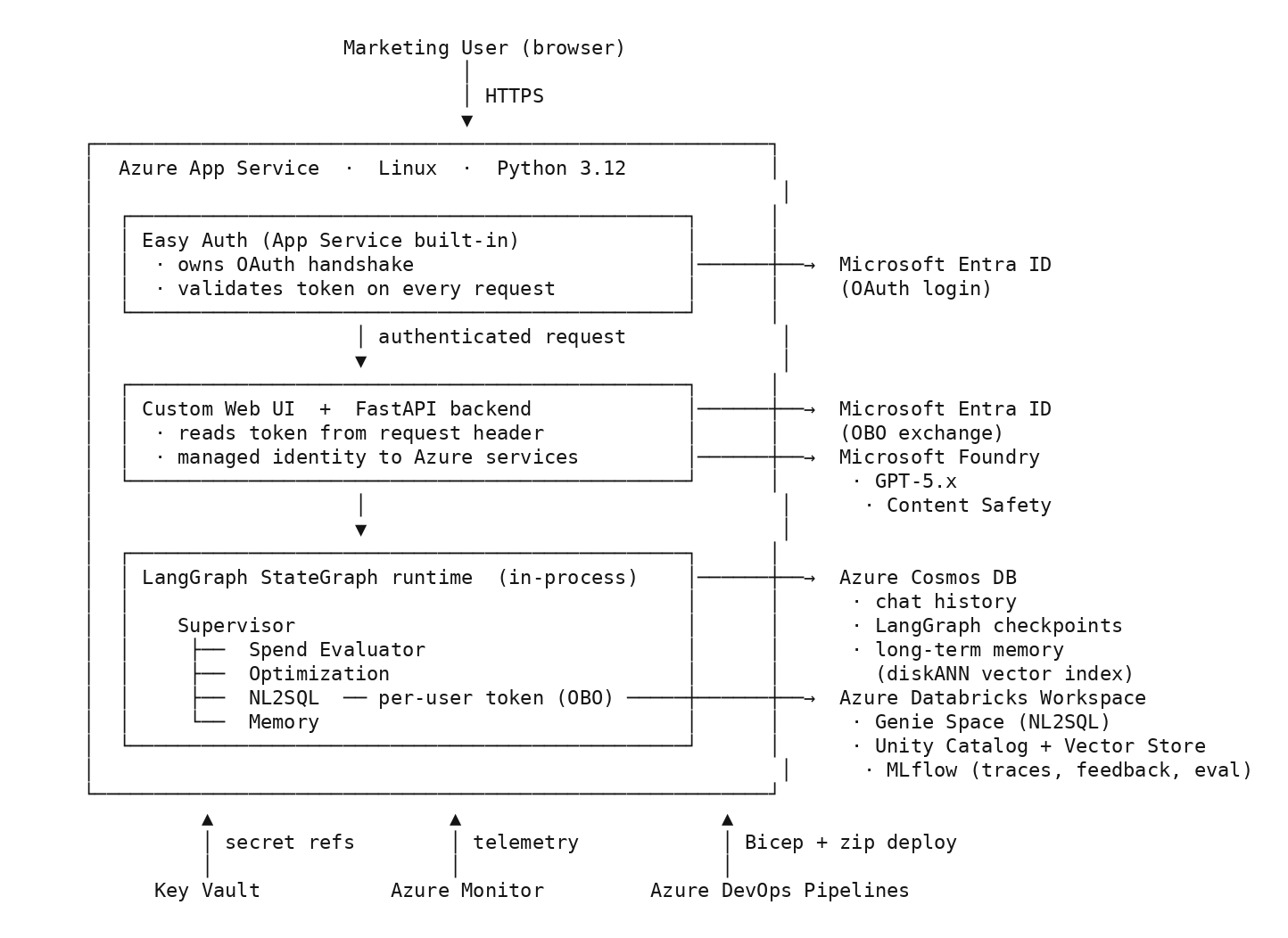
Here’s what the full architecture looks like:
The arrows tell the story. Users hit the custom web frontend. The FastAPI backend handles authentication via Microsoft Entra ID, pulls secrets from Key Vault, and hands off to LangGraph for agent orchestration. The agents call GPT-5 through Microsoft Foundry, which serves as the model catalog for every language model and embedding call on the system. Foundry also runs Content Safety guardrails on every request and every response: prompt shields and content filtering on the way in, response checks on the way back. The agents read and write to three Cosmos DB containers and query Azure Databricks for marketing data, with the NL2SQL agents going through Azure Databricks Genie Space for the natural-language-to-SQL translation. Azure Monitor collects telemetry across all of it.
MLflow handles the agent-layer telemetry that Azure Monitor doesn’t. We point it at an Azure Databricks-hosted tracking server (configured through MLFLOW_TRACKING_URI and MLFLOW_EXPERIMENT_PATH) and use it for three things, none of them model training or registry. First, tracing: mlflow.langchain.autolog() captures every LangChain and LangGraph call, and each chat session opens an MLflow run keyed to the session thread ID, so we can replay the full agent call tree per conversation. Second, user feedback: the frontend’s thumbs up/down handler logs a structured assessment via mlflow.log_feedback, tagged with the user identifier. Third, LLM-as-judge evaluation: online scorers run against every live response for relevance and safety, and an offline suite scores a golden dataset on correctness, relevance, and formatting/numerical-delta, with PASSED/FAILED tags and per-run artifacts. Azure Monitor catches what the system does. MLflow catches what the agents do.
The Azure DevOps pipeline deploys both the infrastructure (via Bicep templates) and the application code.
Infrastructure as Code or it didn’t happen
We used Bicep templates for everything. Two modules: one for the App Service, one for Cosmos DB.
The Cosmos DB module creates a database with three containers, each serving a different persistence concern. The first stores chat history for the frontend (partitioned by namespace). The second handles LangGraph checkpointing (partitioned by partition_key), which lets the agent workflows pause and resume mid-conversation without losing state. The third is the most interesting: a long-term memory store with a vector index, which is what the Memory agent reads from and writes to. It uses diskANN, a graph-based approximate nearest-neighbor algorithm from Microsoft Research, with cosine similarity to match items by meaning rather than exact keywords. Think of it as the database equivalent of “find me things similar to this” instead of “find me things that contain this exact phrase.” This container stores user profiles and preferences, so the agent remembers who you are and how you work across sessions. Each container uses autoscale throughput so we’re not guessing capacity upfront.
The App Service module provisions a Linux web app with a managed identity. That managed identity authenticates to Foundry via RBAC (Role-Based Access Control), so there are no API keys for model access anywhere in the codebase. The same identity accesses Cosmos DB and Key Vault. The startup command is one line:
gunicorn src.main:app -k uvicorn.workers.UvicornWorker --bind 0.0.0.0:8000
The deployment pipeline injects everything else: all 28 app settings. Database endpoints, Foundry project endpoints, feature flags, telemetry connection strings. Six secrets come from Key Vault references so they never appear in plain text anywhere in the pipeline definition.
Two layers of identity
Managed identity solves service-to-service auth: the App Service talks to Cosmos, Foundry, and Key Vault as itself, no secrets in the loop. That’s the easy half.
The harder half is user-to-downstream. When a marketing user asks the agent to query Azure Databricks, the call needs to run as that user, not as the system. Otherwise every request hits Azure Databricks under a single shared identity and you lose row-level access control, audit trails, and the ability to revoke one user without breaking the system.
We used OAuth on the way in and an on-behalf-of (OBO) flow on the way out, so the system exchanges the user’s token for an Azure Databricks-scoped token at request time. What we haven’t shipped yet is refresh-token custody: keeping a long-lived token around so the user’s session survives past the access-token lifetime without bouncing them back through the login flow. Token issuance was the boring part. Token custody is the work we deferred, and the architecture decision was which custody model to build toward.
We looked at two options.
The first was a custom store. Each refresh token encrypted with a per-record data encryption key (DEK), and the DEK wrapped with a master key in Key Vault. Only the backend’s managed identity holds unwrap permission. The split matters: a Cosmos read alone yields ciphertext, a Key Vault breach alone yields a wrap key with nothing to unwrap, and the application never persists plaintext outside the token-handling path.
The second was App Service built-in authentication, known informally as Easy Auth. It runs as an isolated module in front of the app, owns the OAuth flow end to end, persists ID, access, and refresh tokens in a platform-managed token store, and exposes a /.auth/refresh endpoint that refreshes them for the authenticated session. Enabling refresh-token issuance from Microsoft Entra ID is a configuration change: add offline_access to loginParameters in authsettingsV2. The app reads the current token from a request header. No cryptography in our code path.
The custom design is correct but it makes us the owner of key rotation, refresh logic, and the threat model. Easy Auth puts all of that on the platform, and it’s the current Microsoft-recommended pattern for App Service apps. We decided to ship Easy Auth in the next milestone and keep the envelope-encryption design as a documented fallback in case we ever leave App Service.
The pipeline
We run a multi-stage Azure DevOps pipeline. The Test stage syncs dependencies with uv from pyproject.toml and uv.lock, runs pytest with coverage reporting, and publishes JUnit results. The Build stage exports a requirements.txt from the lockfile (App Service’s Oryx builder installs with pip and doesn’t know about uv), then packages the source code and Bicep templates into versioned artifacts. The Deploy stage validates the Bicep template, applies the infrastructure changes, configures app settings, and zip-deploys the application.
Each environment (DEV, QA, Production) gets its own stage with environment-specific variables, subscription IDs, resource group names, and SKU (pricing and performance tier) configurations. DEV runs on smaller isolated instances. Production runs on premium SKUs with higher capacity.
The deploy stage has two jobs that run in sequence: infrastructure first, then application. You can’t deploy the app until the Cosmos containers exist.
That pipeline works well now. Getting there involved some painful discoveries.
The stuff that bit us
Environment parity. QA was running a B2 App Service SKU (the basic tier) while DEV and Production ran on isolated premium plans. We caught it during a Bicep parameter review, but if it had reached load testing, the performance numbers would have been meaningless. The fix: make the SKU a parameter in the Bicep template so every environment pulls its tier from the same variable file. No environment gets to be a special case.
Startup order. The app assumes Cosmos DB containers exist on boot. During one deployment, the Bicep validation passed but the container creation timed out. The pipeline moved on. The app started, accepted traffic, and every database call returned a 404 on the container endpoint. The logs showed CosmosResourceNotFoundError on every request, but the health check was only pinging the app process, not the database. The real fix was two things: a health endpoint that verifies Cosmos connectivity, and a pipeline gate that checks container existence before the app deployment job starts.
Secret rotation. Key Vault references are great until someone rotates a secret and the app doesn’t pick it up. App Service caches resolved Key Vault values, and the refresh can lag by hours unless the app is restarted or its config changes. We found this out when a rotated Azure Databricks token caused silent auth failures for 40 minutes before anyone noticed the agent responses had stopped including data. Now we pair every secret rotation with an automated app restart via the pipeline.
Document size. LangGraph short-term memory and checkpoint writes started failing once retrieval results grew in QA. The agent state was carrying full retrieved datasets, the checkpointer persisted that state on every step, and Cosmos DB’s 2 MB document limit started rejecting writes mid-conversation. Worked fine on dev-sized payloads; broke as soon as real data showed up. The fix was to stop treating agent state as a data transport: payloads above a threshold get offloaded to Azure Storage and the checkpoint document holds only a reference. The agent still has the context it needs; Cosmos only stores metadata and pointers.
Those four issues had a common thread, which brings us to the advice section.
What I’d tell someone starting this
Don’t treat infrastructure as the thing you figure out after the demo works on localhost. Build the pipeline in week one. Deploy to a real environment in week two. Every week you delay, you’re accumulating configuration drift between your laptop and production.
Use managed identities everywhere. We use RBAC-based authentication for Foundry, Cosmos DB, and Key Vault. No API keys, no connection strings with embedded credentials. Every time you hardcode a credential, you’re creating a secret that someone will forget to rotate.
Parameterize across environments from day one. SKU tiers, container names, feature flags, throughput limits. If a value differs between DEV and Production, it belongs in a parameter file, not in a copy-pasted config block.
And test your infrastructure changes the same way you test your code. If a Bicep template change breaks the deploy, you want to know in the PR, not in production.
Pick a frontend that can grow. We went code-first: a custom web UI generated by a coding agent from a SKILL.md spec describing the customer’s frontend requirements and design rules. That gives you a real codebase you can extend when customers ask for projects-style grouping, role-specific views, or anything that isn’t a chat shell, and a written spec the agent can re-read when the requirements change. Once an AI product gets real adoption, users ask for things a chat box can’t show: dashboards, projects, role-based views. Plan for a frontend that can grow past chat.
What the user sees is the easy part. The platform underneath is the work.

